Using a generated command (virtual or physical machine)
The following feature is in beta.
A tailored command for installing a poller on a virtual or physical machine can be generated from the central server interface.
Prerequisites
- The machine on which you will install the poller must fulfill the poller installation prerequisites.
- You must have created a poller-type authentication token.
- On the central server, Gorgone's pullwss module must be configured to accept incoming connections. You only need to do this once, before installing your first poller using a command provided by the interface (whether it is installed on a physical machine, a VM, or a container).
Step 1: generate the installation command
-
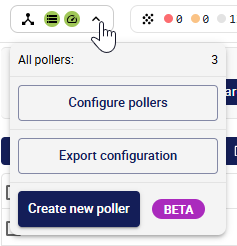
In the interface of the central server, click the Pollers area at the top left. Then, click on Create new poller.
-
Fill in the form with your poller's information:
- Poller name: a unique name for this poller. It will appear in the list of pollers.
- Poller address: the address of the host machine where you are going to install the poller.
The Poller address does not affect connectivity: Gorgone uses PullWSS, so the poller always initiates the connection to the central server, not the other way around.
- Centreon Central address, as seen by this poller: the URL this poller uses to reach the central server, e.g.
http(s)://10.10.10.10/centreon. If your central server is configured in HTTPS, the connection between the central server and the poller will be automatically configured in HTTPS too.
-
Select VM or physical as the poller's environment.
-
Select the authentication token you have created for this poller.
-
In the Generate installation command section, click the button and wait for the command to be generated.
-
Copy the command using the button at the top right of the code block and execute it on your host machine.
-
Click Export configuration. The poller appears in the list of pollers.