Monitoring non-public user journeys (closed beta)
A private Synthetic Monitoring Zone (STM Zone) allows you to monitor your user journeys on internal domains or networks specific to your organization using a probe deployed inside your infrastructure.
Prerequisites
- A machine inside your infrastructure to host the probe. The machine must be able to access the application you will monitor.
- The Docker credentials provided by Centreon. The credentials are sent by Centreon using a secure Keeper link. Save these credentials in your own safe.
- A user journey configured on the internal application to monitor.
Step 1: Create a new STM zone
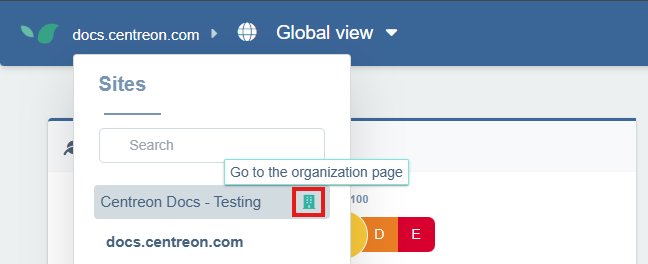
- From the Global View, open the site selector in the top-left corner and select your organization’s page.
-
On your organization’s configuration page, click the Synthetic Monitoring Zones tab.
-
Click + New Synthetic Monitoring Zone. Give the zone a meaningful name (e.g., Paris Office) then click + Create.
Your new zone now appears in the list.
Step 2: Associate a probe to the STM zone
-
Click Associate a probe to the right of your zone. A window opens with 2 Docker commands:
-
Use the first command to log into the Centreon Docker registry with the credentials provided by Centreon
docker login docker.centreon.com/centreon-dem-beta
Step 3: Create and launch the probe
-
To create and launch the probe, execute the second command you obtained at step 2.
-
Refresh the page: once launched, the probe is automatically saved and appears to the right of the associated zone in the Synthetic Monitoring Zones list.
Step 4: Associate the zone with a user journey
-
Go to Configuration and select the User Journeys tab.
-
On the journey you want to run from your private zone, click on the three dots on the right, then click on Advanced.
-
In the Advanced configuration window, scroll down to the Synthetic Monitoring Zones section. Your private zone appears under Private Zones. Select it and click Save.
After a short while, the probe will have executed its first check and your internal journey monitoring will be operational. You can analyze it just like a regular user journey.