Simple collector configurations
Here are two examples of simple configurations. If you want to collect many types of logs from the same host, use Full collector configuration (multiple log sources).
Example 1: Quick configuration to start collecting logs from Windows Event Viewer
-
On a Windows machine, install the OpenTelemetry Collector.
-
In Centreon Log Management (CLM), generate a token to authenticate the host to your CLM platform.
-
On your Windows machine, edit the config.yaml file that was created in the directory where you installed OpenTelemetry Collector. By default, it is located here:
C:\Program Files\OpenTelemetry Collector\config.yaml -
Replace the file's contents by the snippet below (replace mytoken with your actual token). Make sure you save the file as an administrator.
# Copyright 2025 Centreon.
# SPDX-License-Identifier: Apache-2.0

exporters:
  otlphttp/centreon: # The exporter that will send logs to CLM
    endpoint: "https://api.euwest1.obs.mycentreon.com/v1/ingress/otlp"
    headers:
      "X-Api-Key": "mytoken" ## Replace mytoken by your actual token
  debug: # The exporter that will write debug info to log files
    verbosity: detailed

processors:
  batch: # This processor optimizes performance.
  resourcedetection: # This processor enriches ALL logs with the information defined below.
    detectors: ["system"]
    system:
      resource_attributes: # Each log entry will include the 4 attributes listed below.
        host.name:
          enabled: true
        os.name:
          enabled: true
        os.type:
          enabled: true
        os.version:
          enabled: true

receivers:
  windowseventlog/application:
    channel: application
    operators:
      - type: severity_parser
        parse_from: body.level
        overwrite_text: true
        mapping:
          fatal:
            - Critical
            - Critique
          error:
            - Error
            - Erreur
          warn:
            - Warning
            - Avertissement
          info:
            - Informational
            - Information
      - type: copy
        from: body.execution.process_id
        to: attributes["process.pid"]
      - type: copy
        from: body.provider.name
        to: resource["event.provider.name"]
      - type: copy
        from: body.provider.guid
        to: resource["event.provider.guid"]
        if: "body.provider.guid != ''"
      - type: copy
        from: body.event_id.id
        to: attributes["event.id"]
      - type: copy
        from: body.record_id
        to: attributes["event.record.id"]
      - type: copy
        from: body.task
        to: attributes["event.task"]
      - type: move
        from: body.message
        to: body
      - type: add
        field: resource["service.version"]
        value: "1.0.0"
      - type: add
        field: resource["service.name"]
        value: "windows-event-log"
      - type: add
        field: resource["service.namespace"]
        value: "application"

service:
  pipelines: # This defines the order in which the collector runs its components.
    logs:
      receivers: [windowseventlog/application]
      processors: [batch, resourcedetection]
exporters: [otlphttp/centreon] -
Restart the OpenTelemetry Collector service.
net stop otelcol-contrib
net start otelcol-contrib
You should start receiving logs in Centreon Log Management.
Example 2 : One configuration file with 3 log sources
In the following example, we receive data from three different sources on the same Windows server. Logs go through only one pipeline. All of the configuration is gathered into the collector's config.yaml file. (Follow the same procedure as in example 1 and adapt the configuration file below.)
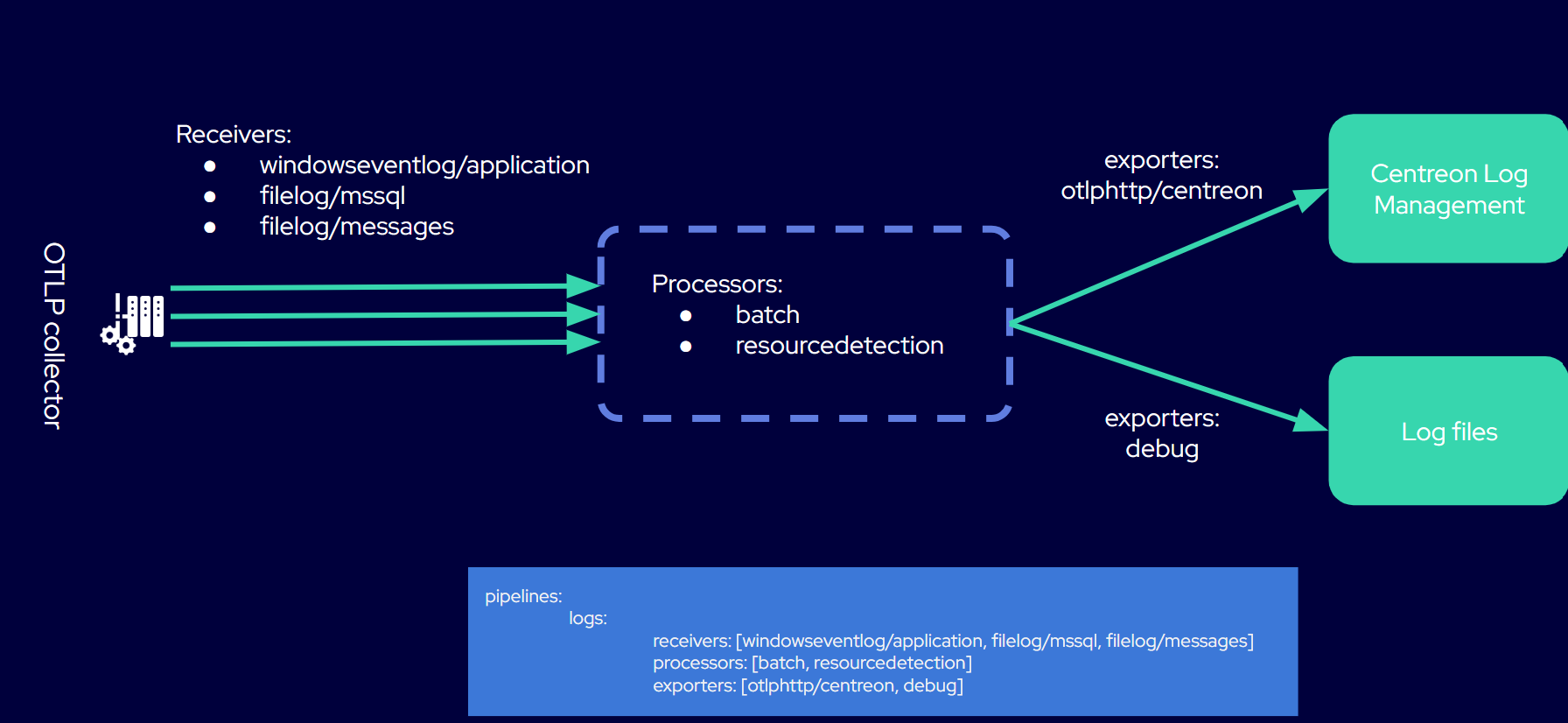
# Copyright 2025 Centreon.
# SPDX-License-Identifier: Apache-2.0

exporters:
  otlphttp/centreon: # The exporter that will send logs to CLM
    endpoint: "https://api.euwest1.obs.mycentreon.com/v1/ingress/otlp"
    headers:
      "X-Api-Key": "mytoken" ## Replace mytoken by your actual token
  debug: # The exporter that will write debug info to log files
    verbosity: detailed

processors:
  batch: # This processor optimizes performance.
  resourcedetection: # This processor enriches ALL logs with the information defined below.
    detectors: ["system"]
    system:
      resource_attributes: # Each log entry will include the 4 attributes listed below.
        host.name:
          enabled: true
        os.name:
          enabled: true
        os.type:
          enabled: true
        os.version:
          enabled: true

receivers:

  windowseventlog/application: # You will receive logs from the Windows Application Event Log.
    channel: application
    operators:
      - type: severity_parser
        parse_from: body.level
        overwrite_text: true
        mapping:
          fatal: [Critical, Critique]
          error: [Error, Erreur]
          warn: [Warning, Avertissement]
          info: [Informational, Information]
      - type: move
        from: body.message
        to: body
      - type: add
        field: resource["service.namespace"]
        value: "application"
      - type: add
        field: resource["service.name"]
        value: "windows-event-logs"

  filelog/mssql: # You will receive logs from Microsoft SQL Server log files.

    include:
      - 'C:\Program Files\Microsoft SQL Server\MSSQL16.MSSQLSERVER\MSSQL\Log\ERRORLOG'
    encoding: utf-16le
    start_at: end
    multiline:
      line_start_pattern: '^\d{4}-\d{2}-\d{2}'
    operators:
      - type: regex_parser
        regex: '^(?P<time>\d{4}-\d{2}-\d{2} \d{2}:\d{2}:\d{2}\.\d+)\s+(?P<source>[^\s]+)\s+(?P<msg>(?s).*)'
        timestamp:
          parse_from: attributes.time
          layout: '%Y-%m-%d %H:%M:%S.%f'
      - type: add
        field: resource["service.name"]
        value: "mssql-server"

  filelog/messages: # You will receive logs from the system log files specified in the "include" attribute.
    include:
      - /var/log/messages
    include_file_path: true
    operators:
      - type: regex_parser
        regex: '^(?P<ts>\w{3}\s\d{2}\s\d{2}:\d{2}:\d{2})\s(?P<hostname>[\w_-]+)\s(?P<process>[\w_-]+)(\[(?<pid>\d+)\])?:\s(?<body>.*)$'
        timestamp:
          parse_from: attributes["ts"]
          layout: '%b %d %H:%M:%S'
      - type: move
        from: attributes["pid"]
        to: attributes["process.pid"]
      - type: move
        from: attributes["process"]
        to: resource["service.name"]
      - type: remove
        field: attributes["ts"]
      - type: move
        from: attributes["body"]
        to: body
      # Add a service version, the template version
      - type: add
        field: resource["service.version"]
        value: '1.0.0'
      # Remove the hostname, use the resource detectors
      - type: remove
        field: attributes["hostname"]

service:
  pipelines: # This defines the order in which the collector runs its components.
    logs:
      receivers: [windowseventlog/application, filelog/mssql, filelog/messages]
      processors: [batch, resourcedetection]
      exporters: [otlphttp/centreon, debug]