Defining alert rules
From logs to alert events
Logs have a severity (i.e., a log level) that indicates how serious an event is. However, severity only tells you about the nature of a single log. On its own, this is not enough. Logs often need to be analyzed together.
For example, an INFO log entry might simply record that a user tried to log in. But if you see 300 login attempts (and therefore 300 INFO entries) within 10 seconds, that suggests a problem.
To detect issues like this, you need to create alert rules.
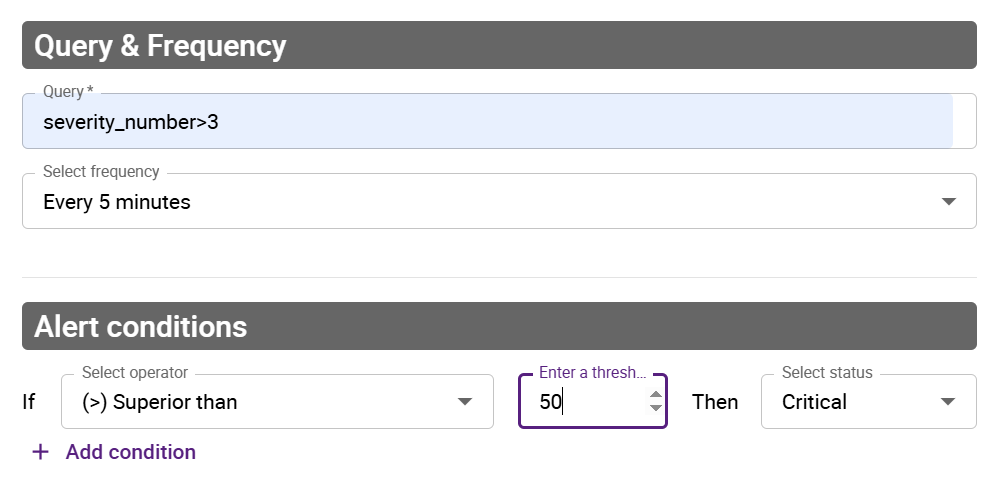
An alert rule evaluates specific criteria and generates alert events, each with an alert status. For example, an alert rule might be described like this in words: "If this query returns more than 50 results in the last 5 minutes, an alert event with the CRITICAL status should be recorded."
- aggregation type: count
- frequency: 5 minutes
- alert conditions: if > 50, then alert status = CRITICAL
Possible alert statuses are:
- CRITICAL
- ERROR
- WARNING
- OK
- UNKNOWN
Defining an alert rule
-
Go to Alerts > Alert rules.
-
Click Add.
-
In the window that appears, enter a name and a description for your alert rule, then define the criteria you want.
-
Save your alert rule. The window is closed and you alert rule appears in the list of alert rules.
Viewing all alerts
Go to Alerts > Alert events.