BMC Footprints 11
How it works
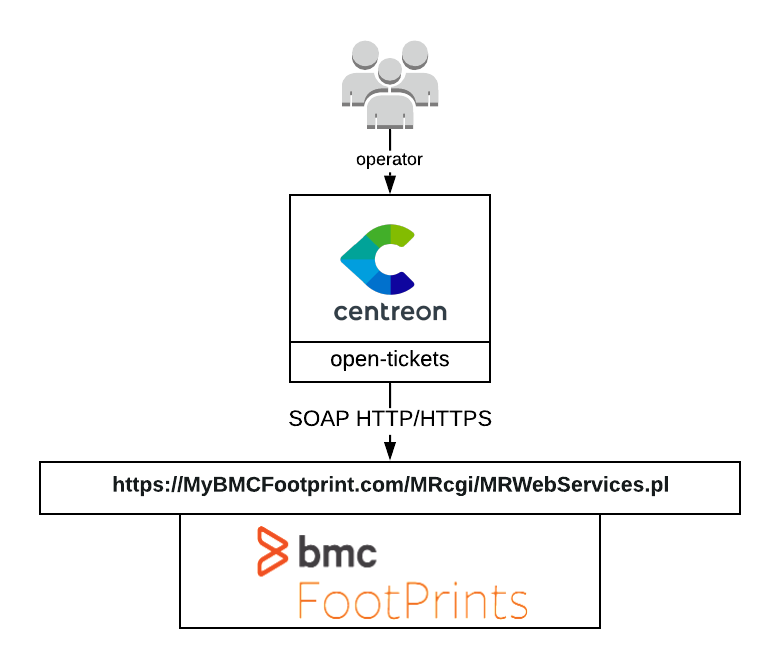
BMC Footprints 11 open-tickets provider uses the BMC Footprints SOAP API to open incidents about your monitoring alerts.
Compatibility
This integration is (at least) compatible with the following BMC Footprints versions:
- 11.x
Feature information
| Open ticket | Close ticket (from Centreon to BMC Footprints) | Handle custom fields |
|---|---|---|
| ✓ | ✘ | ✘ |
Requirements
Before going any further, make sure that you correctly setup centreon-open-ticket into your Centreon instance.
This provider requires the following parameters:
| Parameter | Example of value |
|---|---|
| Address | 10.11.12.13 |
| Webservice Path | /MRcgi/MRWebServices.pl |
| Action | /MRWebServices |
| Username | centreon |
| Password | MyPassword |
| Timeout | 60 |
Network flow
| Source | Destination | Protocol/Port |
|---|---|---|
| Centreon central server | BMC Footprints | TCP/443 (https) or TCP/80 (http) |
Account
You need the following information:
- Username
- Password
The aforementioned account must be able to open a ticket through the SOAP API action MRWebServices. Some test commands that you can run from your Centreon central server are available in the Test commands section.
Data sent
This open ticket provider can send the following information when opening a ticket:
- Project ID
- Priority
- Assignee
- Status
Test commands
The curl commands listed below must be run from your central server. You need to replace all elements between <>. For example <footprints_address> may be replaced with my_footprints.local.
In the --data part of the curl command, all <UPPER CASE> information must be replaced with their appropriate values (therefore, <TITLE> may be replaced with "Test ticket").
Open a ticket
Keep in mind that the data in the command below is just an example and your footprints server may ask you to add mandatory data.
curl --location 'https://<footprints_address>/<footprints_action>' \
--header 'text/xml;charset=UTF-8' \
--header 'SOAPAction: https://<footprints_address>/<footprints_action>#MRWebServices__createIssue' \
--data '<?xml version="1.0" encoding="UTF-8"?>
          <soap:Envelope
              xmlns:xsi="http://www.w3.org/2001/XMLSchema-instance"
              xmlns:soapenc="http://schemas.xmlsoap.org/soap/encoding/"
              xmlns:xsd="http://www.w3.org/2001/XMLSchema"
              soap:encodingStyle="http://schemas.xmlsoap.org/soap/encoding/"
              xmlns:soap="http://schemas.xmlsoap.org/soap/envelope/">
          <soap:Body>
              <MRWebServices__createIssue
                  xmlns="https://<footprints_address>/<footprints_action>">
                  <c-gensym3 xsi:type="xsd:string"><USERNAME></c-gensym3>
        <c-gensym5 xsi:type="xsd:string"><![CDATA[<PASSWORD>]]></c-gensym5>
        <c-gensym7 xsi:type="xsd:string"/>
        <c-gensym9>
            <assignees
                soapenc:arrayType="xsd:string[1]" xsi:type="soapenc:Array">
                <item xsi:type="xsd:string"><ASSIGNEE></item>
            </assignees>
            <projfields><PROJECT_NAME> xsi:type="xsd:string"><PROJECT_VALUE></<PROJECT_NAME></projfields>

            <status xsi:type="xsd:string"><STATUS></status>
            <projectID xsi:type="xsd:int"><PROJECT_ID></projectID>
            <title xsi:type="xsd:string"><![CDATA[<TITLE>]]></title>
            <description xsi:type="xsd:string"><![CDATA[<DESCRIPTION>]]></description>
        </c-gensym9>
    </MRWebServices__createIssue>
</soap:Body>
</soap:Envelope>
'